
How to Automate Employee Attendance and Leave Management
Last updated:
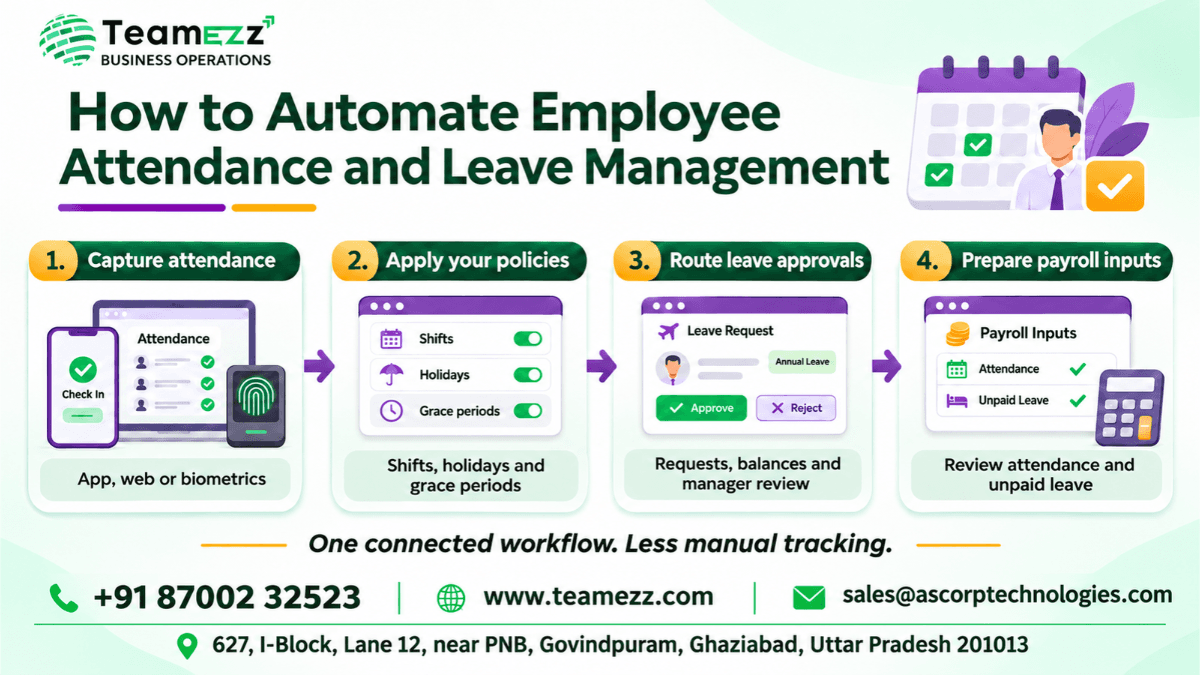
In case your HR is still struggling with registration, WhatsApp leaves, and Excel sheets every month-end, then you are wasting precious time in hiring and growing people. But the bright side is that automating employee attendance and leave processes takes just a few weeks and doesn’t require any large-scale IT team or budgets.
This guide covers everything about why the manual process is not working, how to automate it, and which tool is best suited for an Indian MSME.
Why Manual Attendance and Leave Tracking Fails
Registers and spreadsheets are viable for 5 employees. The flaws emerge rapidly with 25 or 50 employees:
- Miscounts: Delays, half-days, and unpaid leaves result in salary disputes.
- No real-time insight: The managers have no way to know which employee is on leave on the same day.
- Slow approvals: Requests for leave tend to be lost in chats and conversations.
- Proxy and buddy punching: Paper-based registers can easily be tampered with.
- Compliance risks: Absence of leave and attendance records poses trouble during inspections and audits.
What "Automation" Actually Means
With automation in attendance and leave management, the process is completed in one single system:
- Staff record attendance using either the (app, biometrics, or the website).
- The software automatically takes into consideration your shifts, late markings, and half-day provisions.
- Leave requests are sent to the appropriate manager for their approval.
- Leaves are updated in real-time.
- The attendance and leaves records are immediately synchronized with the payroll system.
No re-entry, no month-end reconciliation.
Step-by-Step: How to Automate Attendance and Leave Management
Step 1: Document Your Current Policies
Before using any application, write down your policies clearly:
- Working days, shifts, and weekly holidays
- Grace period for being late
- Half-day leaves and short leaves
- Types of leaves (casual, sick, earned, comp-off, unpaid), etc.
- Annual leaves allocation per type
- Carry-forward and encashment policy
- Holiday list by location
Application can only automate the clearly defined policies.
Step 2: Choose Your Attendance Capture Method
Pick what fits your workforce:
Method | Best for | Watch out for |
Mobile app with GPS & selfie | Field teams, remote staff, sales | Needs smartphones |
Biometric / face recognition | Offices, factories, retail | Hardware cost, device maintenance |
Web check-in | Desk-based teams | Easier to misuse without IP/location rules |
Hybrid | Mixed workforce | Needs one central system |
https://www.teamezz.com/#features
Step 3: Set Up Shifts, Rules and Holidays in One Place
Adjust shift timings, grace period, and overtime as well as holidays in the HRMS. It is advisable to choose an HRMS that allows you to set different policies in various departments or branches.
Step 4: Create an Automated Leave Process
A proper leave process contains:
- Self-service request: Employee applies using the app with the leave type and dates.
- Auto-routing: The request is routed to the reporting manager and to HR.
- Instant balance validation: No leave requests will be approved which exceed the leave balance.
- Notifications: Approvals/rejections and reminders through email/App.
- Team calendar: To check availability of employees while approving the leave.
https://www.teamezz.com/leave-management-system
Step 5: Connect Attendance and Leave to Payroll
Here are the savings. Because attendance and leaves are inputted directly to payroll, there is no need to manually calculate the loss of pay.
The late arrivals, half days, overtimes, and unpaid leaves are directly translated into salary deductions.
https://www.teamezz.com/online-payroll-service-small-business
Step 6: Train the Team and Roll Out in Phases
- Test the process for 2 weeks in just one department/branch.
- Conduct both processes together for one cycle.
- Provide a brief video tutorial or WhatsApp tutorial to your employees.
- Get feedback, make changes to the policies and proceed with the entire organization.
Key Features to Look For in Attendance and Leave Software
For tool comparisons, ensure:
- Mobile app with GPS & selfie attendance
- Custom shift, grace, and overtime policies
- Hierarchical approval process for leaves
- Real-time dashboards and exportable reports
- Payroll integration
- Role-based access (employee, manager, HR, admin)
- Compliance with Indian law (PF, ESI, and local holidays)
- Affordable pricing per employee for MSMEs
Benefits You Can Expect
- Savings in hours each month: No need for HR to gather data, but instead analyze data.
- Fewer payroll complaints: All see the same attendance and leave record.
- Increased accountability: Time and location stamp prevents proxy attendance.
- Quick approvals: Approvals can be done on the spot by managers via cell phones.
- Audit ready: Data stored securely and easily exported.
Common Mistakes to Avoid
- Automation of ambiguous policies: Resolve them first.
- Omitting training of employees: Adoption failure will render your ROI worthless.
- Selecting hardware before software: Ensure that your hardware is integrated with your HRMS.
- Neglecting data security: Select an organization that offers cloud storage that is secure and controlled by access.
- Employing different systems for attendance, leave, and payroll: Isolation of systems will result in manual operations.
How TeamEzz Helps Indian MSMEs Automate HR
TeamEzz is an HRMS, ERP, CRM, and project management suite designed for Indian MSMEs. Rather than switching between multiple systems, your team can handle employee attendance, leave, and overall operation through a single dashboard interface that can be accessed via both web and mobile devices.
Want to see it in action? Visit www.teamezz.com and book a demo.
Frequently Asked Question
How can one automate the attendance of employees?
Use cloud HRMS with mobile application for attendance (GPS & selfie) and biometrics integration to ensure that check-ins go directly to the report & payroll without manual entry.
Can one automate the leave management process without using biometric devices?
Sure. Attendance and leave management are different processes. The employee applies for leaves through the app and the manager approves the request.
How much time is required to implement the automation of attendance and leave management processes?
Implementation for the small or medium enterprise may require several days to 2 weeks depending on policy configuration and employee onboarding and testing cycle.
Does automation work for field and remote employees?
Certainly. One can control field and remote employees by implementing GPS and geo-fenced check-in via mobile app.
Is attendance software suitable for small businesses having less than 50 employees?
Sure. There is a wide variety of HRMS software which allows per-employee pricing model.
Conclusion
In case of automated tracking of attendance and leave management of employees, create your own policy, choose the right medium for information capturing, create your own process for approving it, and integrate all this in payroll processing. This will result in greater efficiency and accuracy in approvals and save a lot of time for HR.
Planning to move away from manual systems? Explore TeamEzz at www.teamezz.com and start automating today.