
Run Small Business Payroll, PF, ESI & TDS from One Screen
Streamline salary calculations, statutory compliance filings, attendance sync, and instant payslips in minutes. Purpose-built for Indian SMEs and startups.
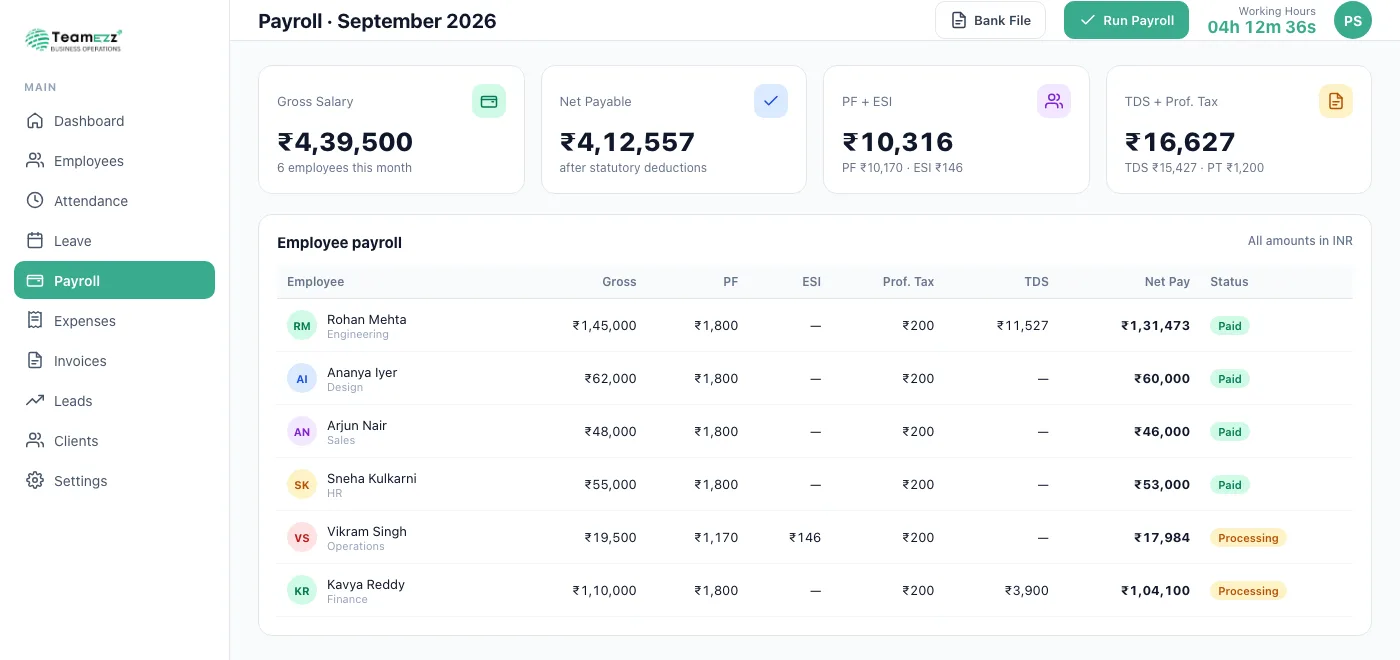
Why SMEs Replace Spreadsheets with TeamEzz Payroll
Manual Excel calculations lead to salary miscalculations, delayed filings, and compliance penalties. TeamEzz automates the entire lifecycle.
- Payroll Miscalculations: Broken formulas and manual copy-pasting cause costly salary mistakes.
- Statutory Penalty Risk: Missing changing Indian PF, ESI, or TDS tax brackets leads to audits and fines.
- Time Drain: Spending 8 to 10 hours every month manually preparing payslips and answering employee queries.
- Automated Calculations: Gross-to-net salary, deductions and reimbursements worked out in every payroll run.
- Statutory Exports: PF ECR and ESI contribution files for each month, and Form 16 downloads.
- One Run a Month: Generate payroll once, then pay by Razorpay payout or bank transfer file, with payslips available online.
Statutory heads: PF, ESI, PT, TDS
Download for every employee
Tax regimes: new and old
Exports: PF ECR, ESI, bank file
Estimate Your Small Business Savings
Monthly Admin Saved
70 Hours
Est. Monthly Savings
₹72,000
Get Your Payroll Running in 4 Simple Steps
Set salaries once, preview the month, and generate payroll. The same data feeds payslips, bank files and statutory exports.
Onboard & Configure
Import employee records from Excel. Set up salary components (Basic, HRA, Allowances).
Apply Leave
Approved unpaid leave is deducted automatically at the per-day salary, so the leave register decides the pay.
Process & Disburse
Automated PF, ESI, and TDS calculation. Export bank payout files to disburse salaries seamlessly.
Comply & Report
Export the PF ECR file and the ESI contribution file each month, and download Form 16 for every employee.
Everything Needed for Complete Small Business Payroll
Automated Salary Processing
Calculate base salaries, overtime, bonuses, variable pay, and deductions with zero manual math.
Statutory PF, ESI & TDS
Built-in compliance engine for Provident Fund, ESI, TDS (Section 192), Professional Tax, and LWF.
Employee Self-Service (ESS)
An employee login to view payslips, submit an income tax declaration with proof, and download Form 16.
Payroll Summary & Exports
A summary of the monthly payroll, payout status for every payslip, and downloads for PF, ESI and the bank file.
Expense Claims Sync
Directly approve employee expense claims and reimburse them seamlessly in monthly salary payouts.
Role-Based Access
Payroll is visible only to the roles you allow, which are Admin and HR by default, and each employee sees only their own payslips.
Manual Spreadsheets vs TeamEzz Payroll Engine
Plans Built for Every Stage of Growth
No hidden fees. Every plan includes full access to core modules with continuous updates.
- Up to 100 employees
- Advance HR
- Advance Sales
- Advance Accounting
- Project Management
- Communication
- Partners
- Organization
- Up to 15 employees
- Core HR
- Retail
- Core Sales
- Basic Accounting
- Organization
- Up to 25 employees
- Core HR
- Communication
- Organization
- Up to 15 employees
- Core HR
- Advance Sales
- Partners
- Basic Accounting
- Communication
- Organization
- Up to 50 employees
- Advance HR
- Advance Sales
- Basic Accounting
- Project Management
- Communication
- Organization
- Up to 100 employees
- Core HR
- Advance Sales
- Partners
- Advance Accounting
- Communication
- Organization
- Up to 100 employees
- Core HR
- Retail
- Advance Sales
- Advance Accounting
- Communication
- Organization
- Up to 500 employees
- Advance HR
- Advance Sales
- Advance Accounting
- Project Management
- Communication
- Partners
- Organization
How a payroll month runs in TeamEzz
Payroll for a small team should be a short routine, not a spreadsheet project. This is the order a month follows, from salary set-up to the files you take to the bank and the PF and ESI portals.
Set up each employee's salary
Enter basic pay, allowances and deductions for every employee. Their PAN, UAN, ESIC number and bank account sit on the same employee record, and every salary revision is kept with the date it takes effect.
Preview the month before anything is saved
The payroll preview shows every employee's earnings and deductions for the month. Approved unpaid leave is deducted at the employee's per-day salary, while paid leave is not, so the leave records you already keep decide the pay.
Generate the month's payroll
One action creates the payslips with PF, ESI, professional tax and TDS worked out. Extra earnings such as overtime, bonus and leave encashment are separate lines, and each payslip moves from Pending to Processed to Paid.
Pay salaries and download the statutory files
Pay through a Razorpay payout, or download a bank transfer file for your bank's corporate portal. The PF ECR file and the ESI contribution file for the month can be downloaded the same way, ready for you to upload.
Let employees see their own numbers
Employees log in to read their payslips, submit their income tax declaration with proof, and download their Form 16. HR sees the tax declarations in one list instead of chasing papers.
The Indian payroll rules built into the calculation
These are the rates and limits the payroll engine uses today, so you know what to expect before your first run.
Provident Fund
12% from the employee and 12% from the employer, worked out on basic salary with the Rs 15,000 monthly wage ceiling applied. The ECR file is exportable for each month.
Employee State Insurance
0.75% from the employee and 3.25% from the employer when monthly gross pay is Rs 21,000 or less. Above that limit no ESI is deducted. An ESI contribution file is exportable for the month.
Professional tax
Calculated on a built-in slab: nothing below Rs 15,000 of monthly salary, Rs 150 below Rs 25,000, and Rs 200 from Rs 25,000.
Income tax (TDS) and Form 16
TDS follows the employee's declaration under the new or the old tax regime: standard deduction, HRA exemption, section 80C (counting PF), 80D, 80CCD(1B), home-loan interest, the 87A rebate, surcharge and 4% cess. Form 16 downloads from the same data.
Professional tax rates differ from state to state. Compare the slab above with your state's before you run payroll, and ask us if you need a different one.
Payroll works with the rest of your HR data
- Leave management system
Unpaid leave approved there is deducted in payroll, and leave encashment requests flow into it.
- Employee management system
Salary, PAN, UAN, ESIC number and bank details live on the employee record payroll reads from.
- Attendance management system
Daily attendance and shifts give you the working-day picture behind each month's pay.
- HRMS software for small business
See payroll next to attendance, leave, onboarding and exits in one HR system.
Frequently Asked Questions
Ready to Simplify Your Small Business Payroll?
Run payroll that is built for PF, ESI, TDS and professional tax, with a free 60-day trial.
Start Free 60-Day TrialFree 60-Day Trial • No Credit Card Required